

Last updated on November 14, 2026 by Krysti
Lost in a Japanese train station? Trying to decipher a restaurant menu? Keeping an eye on an approaching typhoon? Don’t worry – there’s an app for that!
Japan is an absolutely incredible place to visit, offering endless opportunities for exploration, discovery, and cultural immersion.
However, like most travel destinations, it presents its own unique set of challenges.
From language barriers to cultural nuances and complex transit systems, navigating Japan (both literally and figuratively) can feel overwhelming – especially for first-time visitors.
Thankfully, there are plenty of travel apps designed to make exploring the country a little bit easier.
The trick is knowing which ones are actually worth downloading!
After nearly four years of living in Japan, I’ve built up a collection of go-to apps that have become staples in my everyday life.
From hailing taxis and navigating trains to booking activities and checking exchange rates, these apps have made my travels (& life) in Japan a whole lot simpler.
And now, I’d love to share them with you!
Whether you’re visiting for the first time or returning for another adventure, here are 11 of the best travel apps to download before your trip to Japan!
Please note: This post contains affiliate links to trusted partners. If you make a purchase using these links, I will earn a commission at no extra cost to you. Additionally, the developer of ChīpuChīpu provided me with free access to try out their app. That said, all opinions expressed here are entirely my own.
The Best Apps for Japan Travel
Chances are you won’t need every app on this list, but it’s good to know what your options are! To help you navigate this and choose what’s right for you, I’ve grouped my recommendations into three categories: essential apps (aka my top picks), useful apps for specific situations, and extra apps worth having on your radar.
Essential Travel Apps
If you only download a few apps before your trip, I’d start with these! They cover the basics, from navigating Japan to communicating across language barriers.
Google Maps

Price: Free
Availability: iOS & Android
Major Perks: Provides easy-to-follow navigation and route planning via car, train, and on foot.
I use Google Maps all the time in Japan, and honestly, I can’t imagine navigating the country without it.
I’m hopeless when it comes to directions to begin with – even more so when you throw in Japanese characters and street names.
So having an app that can point me in the right direction (literally!) definitely makes getting around easier.
It’s great, whether I’m exploring on foot, driving somewhere new, or even navigating Japan’s complex transit system.
I particularly like that it provides step-by-step directions in English – as well as departure times, platform numbers, and transfer routes for train travel.
It even offers information on the most convenient subway exits, which certainly comes in handy, especially in larger cities.
💡Pro Tip: Google also has a “My Maps” tool that lets you create custom maps, pinning attractions, restaurants, and other places you want to visit. I use this feature quite often to organize and plan out my own itineraries!
Google Translate
Price: Free
Availability: iOS & Android
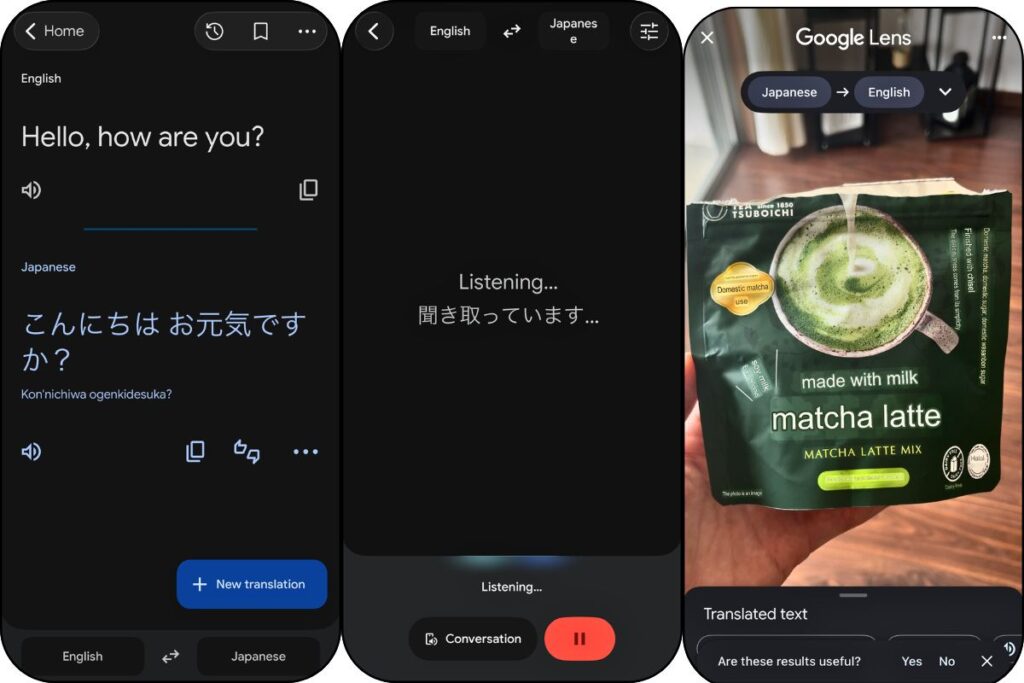
Major Perks: Offers instant translation between English and Japanese in real-time via text, voice, and photo.
Although I do recommend learning a little bit of Japanese before your trip, it’s a challenging language to master!
So, unless you’ve been studying for a while, chances are you won’t be fluent by the time you visit.
That’s where Google Translate comes in.
While there are several translation apps out there, I find Google Translate to be the simplest and most user-friendly.
You can type in words or phrases for quick translations, use the voice feature to converse with locals, or point your camera at Japanese text to decode it.
I find the camera feature especially useful for reading restaurant menus and translating product names at the konbini (aka convenience store).
💡Pro Tip: You can use Google Translate even when you’re offline! Just be sure to download the app’s English and Japanese language packs before you lose service. Keep in mind that some features, like voice translation, may be limited, but simple text translations should work just fine.
GO Taxi App
Price: Free
Availability: iOS & Android
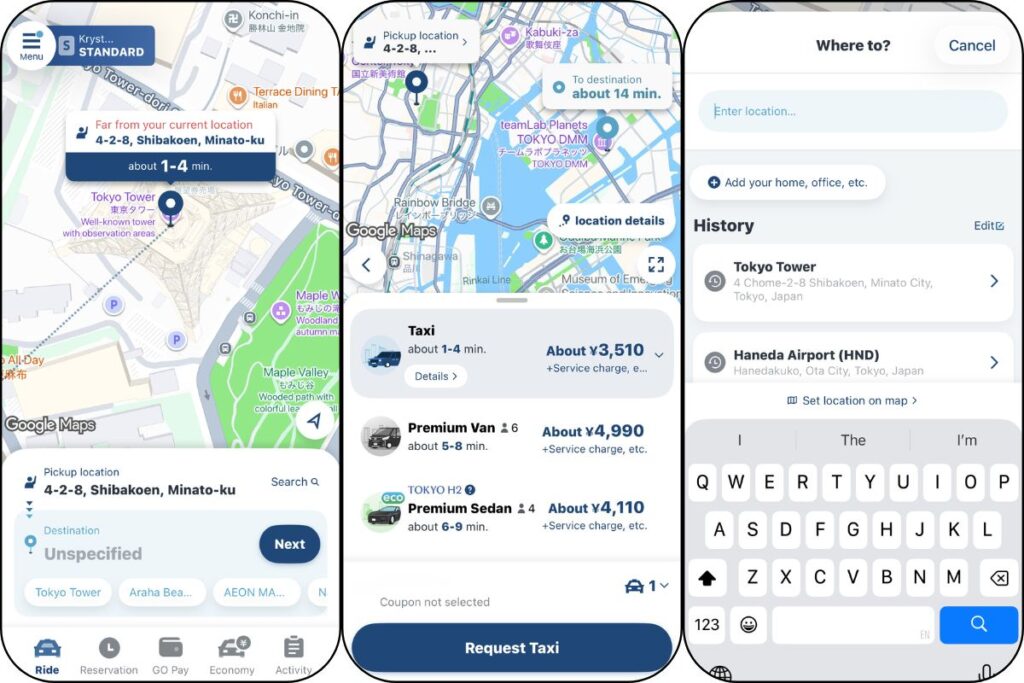
Major Perks: Makes booking taxis in Japan easy with English-language support and in-app payment.
I lived in Japan for a few years before discovering GO, and honestly, I wish I’d known about it sooner!
Unfortunately, traditional ridesharing platforms like Uber aren’t widely available, so traditional taxis are the norm here – and they can be a bit difficult to find.
I can’t tell you how many times I trekked all the way to the train station just to hail one down!
With GO, however, you can request a taxi to come pick you up right where you are.
And everything is done in English, which makes it super easy to use.
Simply input your pick-up and drop-off locations, and you’ll be provided with estimated fares and travel times.
And once you book, you can track your driver and pay right through the app.
📝 Side Note: Although GO is available across Japan, coverage can be limited in more rural and remote areas. I recommend checking availability at your destination if you plan to travel far off the beaten path.
Useful Travel Apps to Consider
Depending on your itinerary, these apps can make certain aspects of your trip a little easier. From booking train tickets to checking the weather and managing your budget, they’re worth considering!
Shinkansen smartEX
Price: Free
Availability: iOS & Android
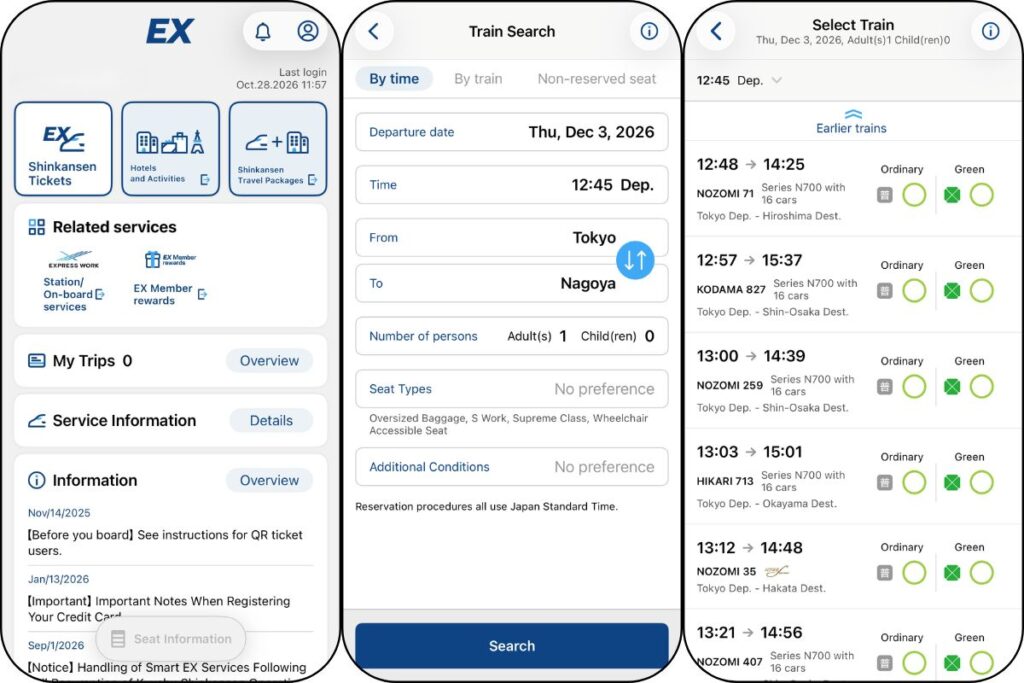
Major Perks: Online platform for booking Shinkansen tickets and reserving seats.
If you plan to travel by bullet train, smartEX is a convenient platform for booking tickets and reserving seats.
While you can also purchase tickets at the train station, I personally prefer booking ahead of time so I can choose my seats in advance.
This is especially helpful during busy periods, like cherry blossom season, when trains can fill up quickly.
It’s also really important if you’re traveling with larger luggage.
Seats with designated space for big suitcases are limited and can sell out quickly – so that’s definitely something to be aware of.
As far as the app itself, I’ve used it several times and find it pretty easy to navigate.
You just need to create an account and connect a payment method to get started!
📝 Side Note: smartEX only covers the Tokaido, Sanyo, and Kyushu Shinkansen lines, connecting major destinations like Tokyo, Kyoto, Osaka, Hiroshima, Fukuoka, and Kagoshima. If your itinerary includes other Shinkansen routes, Klook is a great option to consider if you’d prefer to book your tickets in advance.
ChīpuChīpu
Price: Free with paid features
Availability: iOS
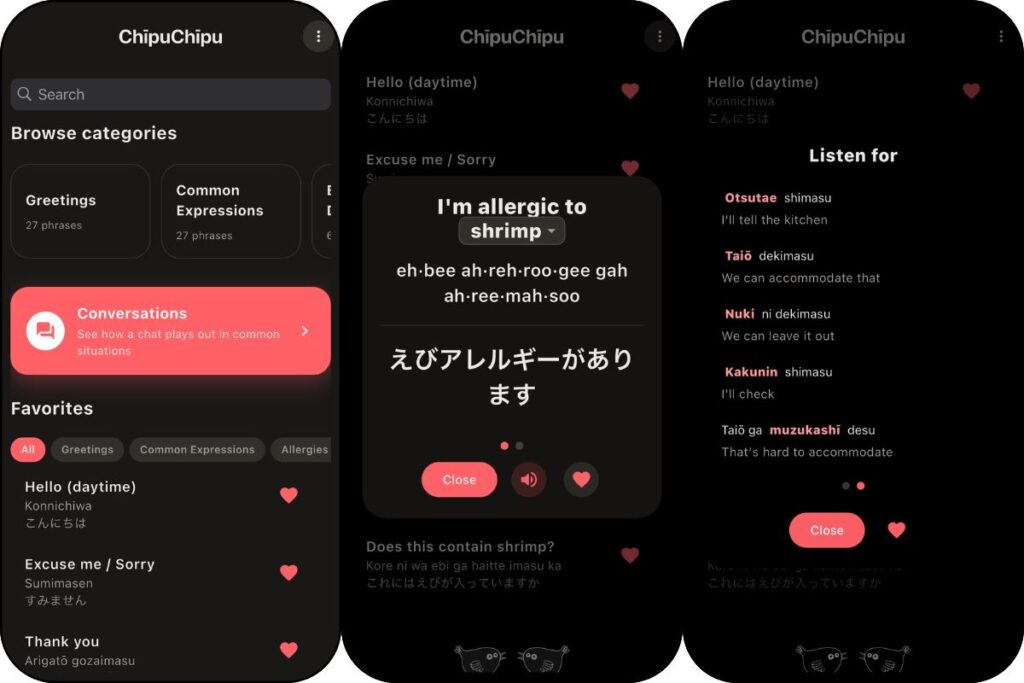
Major Perks: Provides ready-to-use Japanese phrases for common travel situations, with audio and offline access.
While Google Translate is great for translating words and having conversations, sometimes you just need a quick way to communicate a simple request.
That’s where ChīpuChīpu comes in!
This app features handy phrase cards that you can show (or play aloud) when you need to communicate something but aren’t sure how to say it in Japanese.
You can even add phrase widgets directly to your phone’s lock screen, making frequently used words easy to access.
One feature I particularly like is the built-in allergy cards for restaurants.
My husband is allergic to shrimp, so having a card that explains his allergy in Japanese is really helpful when we’re eating out.
It gives us peace of mind, knowing that we can clearly communicate this important information to restaurant staff.
📝 Side Note: ChīpuChīpu is currently only available on iOS, but the developer hopes to bring it to Google Play in the future.
Zoom Earth
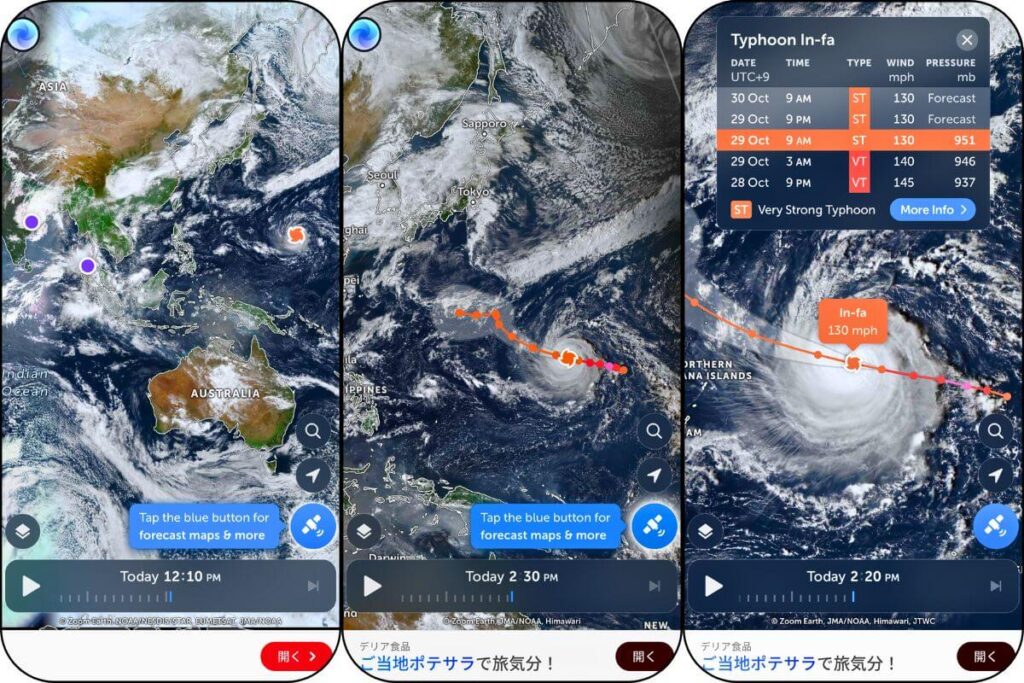
Price: Free with optional subscription
Availability: iOS & Android
Major Perks: Real-time weather maps, satellite imagery, and typhoon tracking to help you monitor weather conditions.
If you didn’t know, Japan gets its fair share of typhoons, which can sometimes disrupt travel plans with flight cancellations, ferry suspensions, heavy rain, and flooding.
While Okinawa and, to some extent, Kyushu are among the regions most affected by storms, the entire country can be at risk during typhoon season.
So, it’s definitely a good idea to keep an eye on the weather, regardless of where you visit.
While most weather apps work just fine for your day-to-day needs, I recommend Zoom Earth specifically for typhoon tracking.
I’ve actually tried out a few different apps since moving to Okinawa, and Zoom Earth is definitely my favorite.
It’s very user-friendly, with clear imagery that makes it easy to track developing storms and monitor their projected paths.
💡 Pro Tip: Japan’s typhoon season generally runs from June through November, with August and September typically being the most active months. That said, I’ve seen typhoons affect Okinawa as early as June, and as late as November, so it’s worth keeping an eye on the weather even outside those peak months.
My Earthquake Alerts
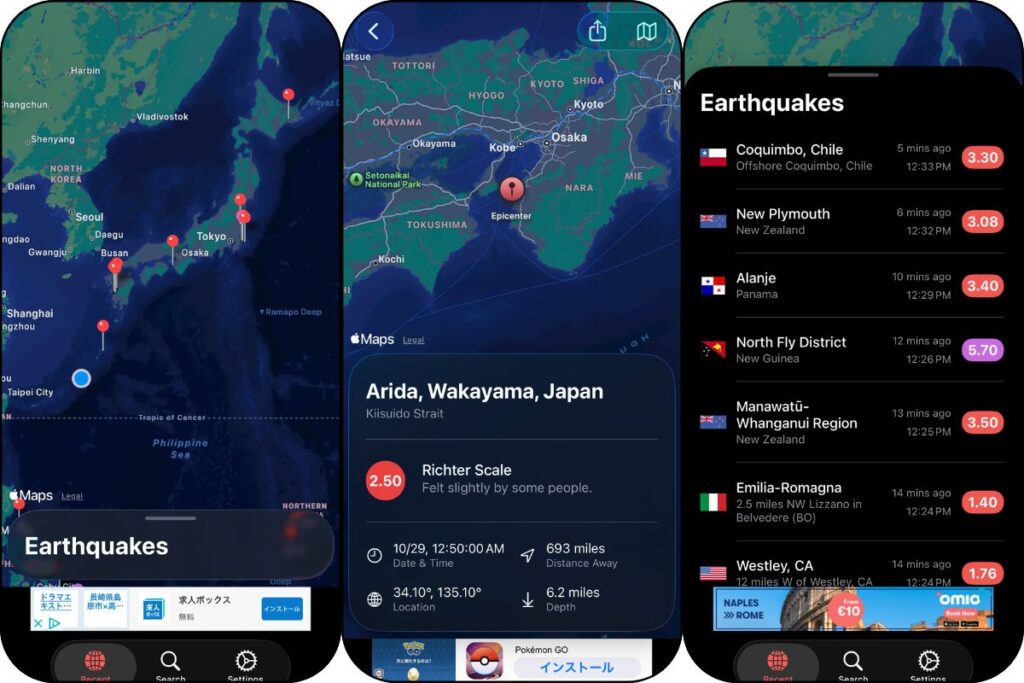
Price: Free
Availability: iOS & Android
Major Perks: Real-time earthquake alerts to help you stay informed during your trip.
Japan experiences earthquakes quite frequently, so having an app that keeps you informed about seismic activity can definitely be useful.
My Earthquake Alerts sends notifications directly to your phone when earthquakes occur and lets you check their location, magnitude, and distance from you.
While there are many apps out there that offer similar features, I find this one to be the simplest and easiest to use.
It’s especially handy for tracking smaller quakes that might not trigger official alerts.
I can’t tell you how many times I’ve felt mild tremors and then immediately look to the app in search of answers.
That said, Japan does have its own emergency alert system, which sends early earthquake and tsunami warnings.
However, these alerts are generally reserved for potentially significant events.
If you want to keep track of smaller tremors, apps like My Earthquake Alerts are a useful way to stay informed.
💡 Pro Tip: To ensure you receive official government alerts, make sure emergency notifications are enabled on your device and supported by your phone and mobile provider.
My Currency Converter & Rates

Price: Free
Availability: iOS
Major Perks: Offers fast, convenient currency conversion on the spot.
Currency conversion can be confusing, especially when rates fluctuate throughout the day.
That’s why I recommend using a conversion app, like My Currency Converter & Rates.
This simple app lets you quickly convert between the US dollars and Japanese yen.
The app even offers a chart overview if you’d like to see how rates have changed over time.
Even though I’ve lived in Japan for years, I still find myself constantly checking conversion rates all the time – because, for some reason, I still think of everything in USD!
📝 Side Note: As of this article’s latest update, My Currency Converter & Rates is only available for iPhone users. That said, there are plenty of other options out there for Android users, including ALL Currency Converter and Currency Converter Plus Rates.
Extra Travel Apps to Keep in Mind
These apps aren’t essential for every trip, but they can still come in handy! From booking activities to staying connected and informed, they’re good to have on your radar.
Duolingo

Price: Free with paid features
Availability: iOS & Android
Major Perks: Offers bite-sized Japanese lessons covering everyday phrases – including Hiragana and Katakana.
If you’d like to go beyond basic phrases and learn some Japanese before your trip, I recommend downloading Duolingo.
It offers easy-to-digest Japanese lessons that touch upon a variety of everyday topics, ranging from introductions and greetings to ordering food and asking for directions.
The app even has a separate section dedicated to the Japanese writing system, aka Hiragana and Katakana.
I found this section to be particularly helpful in terms of learning and memorizing the characters.
While you probably won’t be able to master all of them through Duolingo alone, the information learned can still come in handy when reading simple signs and menus.
Klook

Price: Free
Availability: iOS & Android
Major Perks: Offers a wide variety of tours, activities, and travel services across Japan.
If you plan to book local tours or excursions while in Japan, I highly recommend checking out Klook.
Similar to Viator and Get Your Guide, Klook offers access to an extensive marketplace of local experiences.
Personally, I’ve found it has a wider selection of tours, activities, and attractions in Japan than the other platforms, which is why it has become my go-to!
From cooking classes to guided day trips, food tours, and walking excursions, there’s a little bit of everything.
The app even offers ticket sales to popular attractions, including Tokyo Disney Resort, Shibuya Sky, teamLab experiences, and Universal Studios Japan.
As well as booking services for hotels, airport transfers, car rentals, and rail passes.
LINE
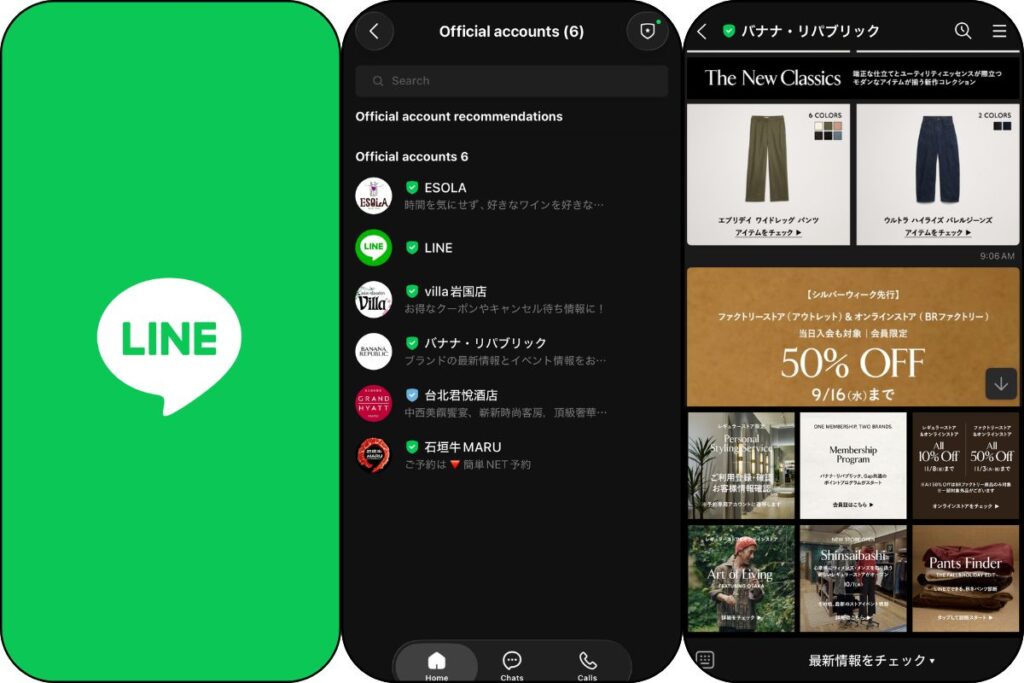
Price: Free with paid features
Availability: iOS & Android
Major Perks: Japan’s most popular messaging platform.
LINE is one of the most well-known apps in Japan for communication and messaging among locals.
It’s so popular that many shops and businesses even use it to communicate with their customers.
In fact, I first downloaded it when I was trying to sign up for an account with Banana Republic in Japan.
The only way to register in their system and receive discounts was to create a LINE account.
Since then, LINE has become a regular mode of communication for me when messaging with locals.
And it is the only way that I know how to contact my pet sitter here in Japan!
While LINE isn’t absolutely necessary for those traveling in Japan, I still recommend downloading it.
Some tour companies use the app as an additional form of communication, and it’s a great way to keep in touch with any locals you may befriend along the way!
Additional Tips for Your Japan Trip

In addition to downloading the right travel apps, there are a few other things you can do to ensure your trip to Japan goes smoothly.
Complete Your Entry Forms with Visit Japan Web
The country’s official immigration and customs website, Visit Japan Web, is a useful resource that can help expedite your entry into the country.
Through this website, you can register your arrival, thereby reducing the amount of paperwork you need to complete at the airport.
Simply create an account, enter your immigration information, and add your travel details.
Once processed, you will receive a QR code that you can scan at the airport when you land upon arrival.
While using Visit Japan Web doesn’t always guarantee a faster arrival process, having your information ready in advance can help make things easier.
📝 Side Note: Visit Japan Web is a free service provided by the Japanese government. Be sure to use the official website rather than third-party sites that may charge a processing fee.
Get Connected with a SIM, eSIM, or Pocket Wi-Fi
If you don’t have an international cell phone plan, then I highly recommend purchasing a SIM card, getting an eSIM, or renting a pocket Wi-Fi device.
While Japan does offer free Wi-Fi hotspots in some tourist areas, they aren’t available everywhere, so it’s best not to rely on them.
You can purchase SIM cards and rent pocket Wi-Fi devices at most major airports upon arrival.
Or, if your phone has the capabilities, you can purchase an eSIM online.
If you plan to use a physical SIM or eSIM, you’ll want to confirm that your phone is unlocked.
You can check with your current mobile carrier if you’re unsure.
Bring a Portable Charger – But Be Mindful!
Chances are, you’ll be using your phone for pretty much everything in Japan – navigating, translating, taking photos, and more.
So, it’s a good idea to bring along a portable charger to keep your battery from running out.
That said, you want to be mindful about the charger you bring and how you pack it.
Recently, airlines, particularly those in Japan, have begun implementing strict policies regarding portable chargers.
This includes limits on the number of chargers allowed, caps on battery capacity (aka watt-hours), and rigid policies on where they should be packed and when they can be used in-flight.
Restrictions and guidelines vary, so it’s best to check directly with your airline to see what’s allowed.
Add a Transit Card to Your iPhone
Many of Japan’s transit cards (aka IC cards) can now be added to your iPhone or Apple Watch, eliminating the need for a physical card.
You can either add a new card (Suica, PASMO, or ICOCA) directly through Apple Wallet or transfer an existing physical card.
Setup is relatively easy and quick to do, and once completed, it allows you to simply tap your device when entering and exiting public transit.
Unfortunately, for Android users, this function is typically only available on devices that have been purchased within Japan.
If you’re coming from overseas with an Android phone, you’ll likely need to use a physical transit card instead.
🌟Unfamiliar with IC cards? Check out my guide to Japan’s transit cards for a full breakdown of what they are and how to use them!
Consider the Japan Rail Pass Carefully
If you plan to visit multiple cities in Japan, it may be worth it to consider a rail pass.
There are several options available, including regional rail passes and the more commonly known Japan Rail Pass – which covers travel across much of the country.
While the nationwide pass can be useful for longer trips with multiple destinations, regional passes may offer better value if you’re focusing on a specific area of Japan.
That said, whether or not a rail pass is worth it ultimately depends on your itinerary and how much you intend to travel.
Before purchasing one, I highly recommend comparing the cost of the pass against the price of individual tickets.
🌟Not sure if a JR Pass is right for you? Check out my Japan Rail Pass guide to compare your options!
Frequently Asked Questions About Using Travel Apps in Japan

Here are my thoughts on some commonly asked questions about visiting Japan.
Do I Really Need to Download an App for My Trip to Japan?
No, you don’t have to download any apps to travel to Japan. However, having a few useful ones on your phone can make getting around, communicating with locals, and planning your trip much easier. If you’re not sure where to start, I recommend focusing on the essentials first. Apps like Google Maps and Google Translate can be particularly helpful for navigating public transportation and communicating when you don’t speak Japanese. From there, you can explore the other apps on my list depending on your itinerary and what you plan to do during your trip.
Does Apple Maps Work in Japan?
Apple Maps does work in Japan, but I personally prefer Google Maps for getting around. When I first moved here, Apple Maps wasn’t the most reliable on public transit, but I have since heard that its train and subway directions have improved – though I haven’t had a chance to test this out for myself. Since I rely on Google Maps for navigating public transportation in Japan, it’s the app I’d recommend if you want reliable directions in English.
Are Translation Apps Reliable in Japan?
Yes, translation apps can be very helpful when traveling in Japan, but they aren’t always perfect. Simple words and phrases are generally easier to translate accurately, while longer sentences, slang, and nuanced conversations can sometimes produce awkward or incorrect translations. I’ve found Google Translate particularly useful for reading restaurant menus, translating signs, and communicating basic questions. However, I wouldn’t rely on it alone for important or complex conversations, especially when it comes to things like food allergies or medical needs. In those situations, having a clearly written translation ready to show someone can help avoid misunderstandings.
Can I Use My Mobile Data in Japan?
Yes, you may be able to use your mobile data in Japan, but it depends on your mobile provider and plan. Some plans include international data, while others charge additional roaming fees that can add up quickly. Before your trip, it’s best to check directly with your provider to see whether your plan covers Japan and whether you’ll incur any extra charges.
Final Thoughts: Best Apps for Japan Travel
Japan is an amazing country to explore, but navigating an unfamiliar place can take a little getting used to.
Between the language barrier, the complex train system, and the occasional unexpected change in plans, having a few helpful tools on hand can make a real difference.
At least, that’s certainly been my experience.
Even after four years in Japan, I still find myself relying on many of these apps regularly.
Whether I’m navigating a major transfer hub like Shinjuku Station, translating a menu at a neighborhood izakaya, or booking a taxi, having these tools at my fingertips makes everyday life – and travel – so much smoother.
That said, you don’t need to have everything figured out before you arrive.
Start with a few apps that suit your needs, and you’ll be off to a great start.
The rest, as with any adventure, you can figure out along the way!
Are there any other travel apps you’ve found useful while visiting Japan? Let me know in the comments below!
Did you enjoy this post about travel apps for Japan? Pin it now for later!



KRYSTI ATKINSON
Krysti is a travel writer currently based in Okinawa, Japan. Over the past 4 years, she has explored Japan extensively while traveling throughout Asia – from iconic cities to quiet, off-the-beaten-path destinations. Through Wanderful Horizons, Krysti shares detailed itineraries, practical travel tips, and firsthand recommendations to help travelers plan unforgettable adventures.



So helpful and concise! Thank you for doing all this work and research and relaying without a long recipeblog story – this is all super helpful! Cheers!
You’re most welcome! I’m glad you found it helpful!